SlopeShift · Assembly guide
Build a SlopeShift wind logger
From a bag of parts to a logger standing in a field. Written for students 14 and up, working with a teacher. Plan on two or three class periods: one for the vane and cups, one for soldering, one for flashing and testing.
Not yet built. The firmware is tested on a PC and compiles for the Pro Mini, but no unit has run on real hardware yet. This guide follows the design. Where a size or distance isn't fixed yet, it says check: try it, then test with live. Tell us what worked.
⚠ WARNING: magnets. This kit contains small, strong magnets. If two or more are swallowed, they can pull together inside the intestines and cause serious injury or death. Get medical help right away if a magnet is swallowed. Not for children under 14. Keep loose magnets away from young children.
⚠ MISE EN GARDE : aimants. Cette trousse contient de petits aimants puissants. Si deux aimants ou plus sont avalés, ils peuvent s'attirer l'un l'autre dans l'intestin et causer des blessures graves ou la mort. Consultez immédiatement un médecin si un aimant est avalé. Ne convient pas aux enfants de moins de 14 ans. Gardez les aimants hors de la portée des jeunes enfants.
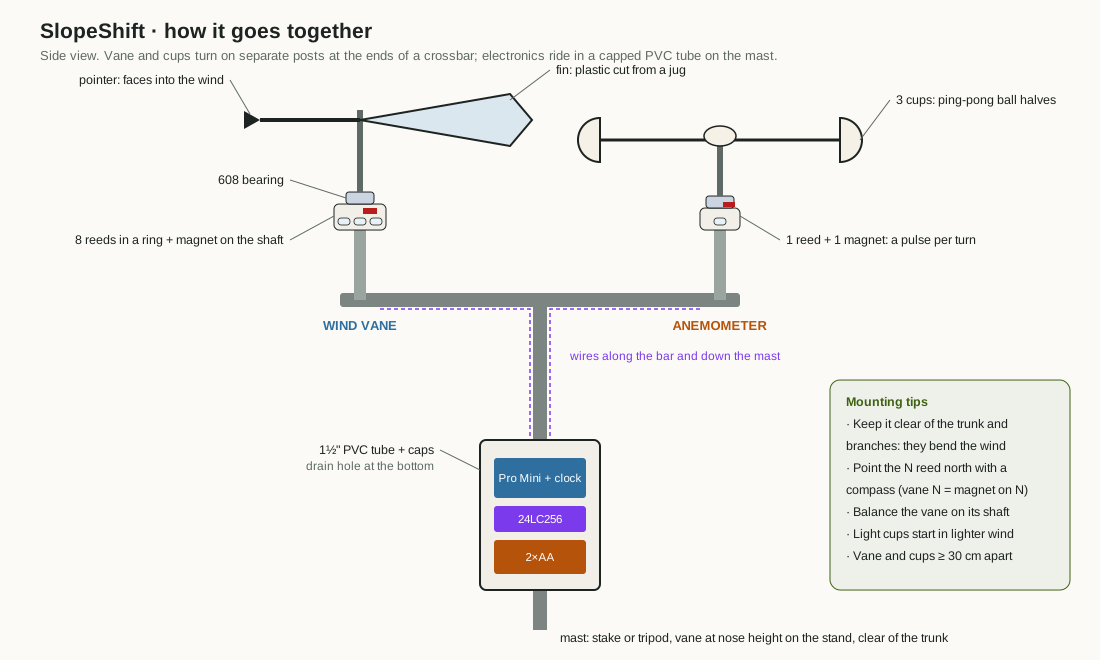
1. Tools and parts
Tools
- Soldering iron, solder, and a damp sponge or brass wool
- Safety glasses for everyone soldering or cutting
- Wire strippers, side cutters, small pliers
- Multimeter (resistance and continuity)
- Hot glue gun, craft knife or scissors, a drill for the PVC caps
- A computer with the Arduino IDE, and a 3.3 V USB-serial adapter
- A phone compass
Parts
| Qty | Part |
|---|---|
| 1 | Pro Mini 328, 3.3 V / 8 MHz |
| 1 | DS3231 clock module (ZS-042) + CR2032 coin cell |
| 1 | 24LC256 memory chip, 8-pin DIP |
| 9 | Glass reed switches, normally open (8 vane, 1 cups) |
| 8 | 1% resistors: 33k, 8.2k, 1k, 2.2k, 3.9k, 16k, 120k, 64.9k |
| 1 | 10k resistor (pull-up) |
| 1 | 100 nF ceramic capacitor |
| 2 | Small neodymium disc magnets, about 6×3 mm |
| 2 | 608 bearings |
| 1 | 2×AA holder with switch, and 2 AA cells |
| – | Plastic jug (vane fin), 3 ping-pong ball halves (cups), pen barrels or dowel (shafts), 1½" PVC tube and two caps, a stake or tripod, hookup wire |
Safety
- Hot iron: put it back in its stand every time. Hold parts with pliers, not fingers.
- Solder in a ventilated room. Wash your hands after handling solder.
- Glass reed switches crack easily. Bend their leads with pliers, a few millimetres from the glass, never at the glass.
- Count the magnets in and out at every session. Store them on a steel plate or in a closed box.
2. The vane ring
Eight reed switches sit in a ring under the vane shaft. A magnet on an arm turns with the shaft and closes the switch it sits over. Halfway between two switches it closes both, which is how eight switches give sixteen directions.
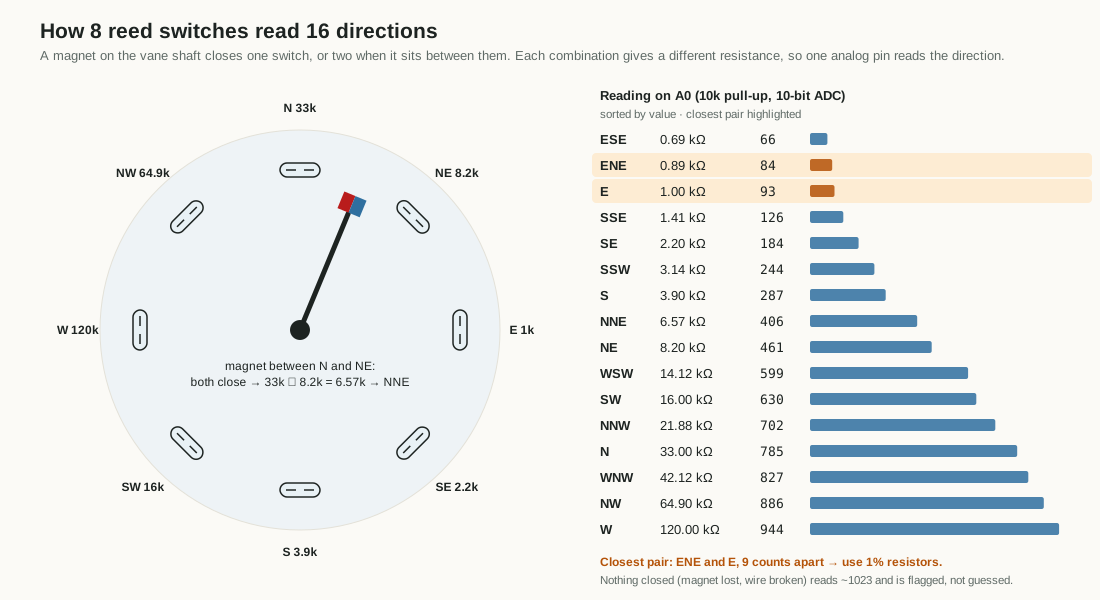
- Cut a disc of stiff plastic or thin plywood for the ring base. Mark its centre and draw eight lines 45° apart. Label them, going clockwise seen from above: N, NE, E, SE, S, SW, W, NW.
- Glue a reed switch along each line, the same distance from the centre. The magnet must pass close over each one. Ring diameter and gap: check. Start with the switches about 2–3 cm from the centre and the magnet a few millimetres above the glass.
- Fit the 608 bearing at the centre so the shaft turns freely.
- Glue one magnet to a short arm on the shaft. Point the magnet arm the same way as the vane's pointer. Then when the pointer faces north, the magnet sits over the N switch.
- Make the vane: a light fin cut from a jug at the back, a pointer at the front. Balance it on the shaft so it doesn't lean. A balanced, light vane turns in the 1–3 mph winds that slope thermals bring.
Test before wiring. Put the multimeter on continuity across one switch and move a magnet over it. It should beep. Move the magnet away. It should stop. Test all eight.
3. Solder the resistor ladder
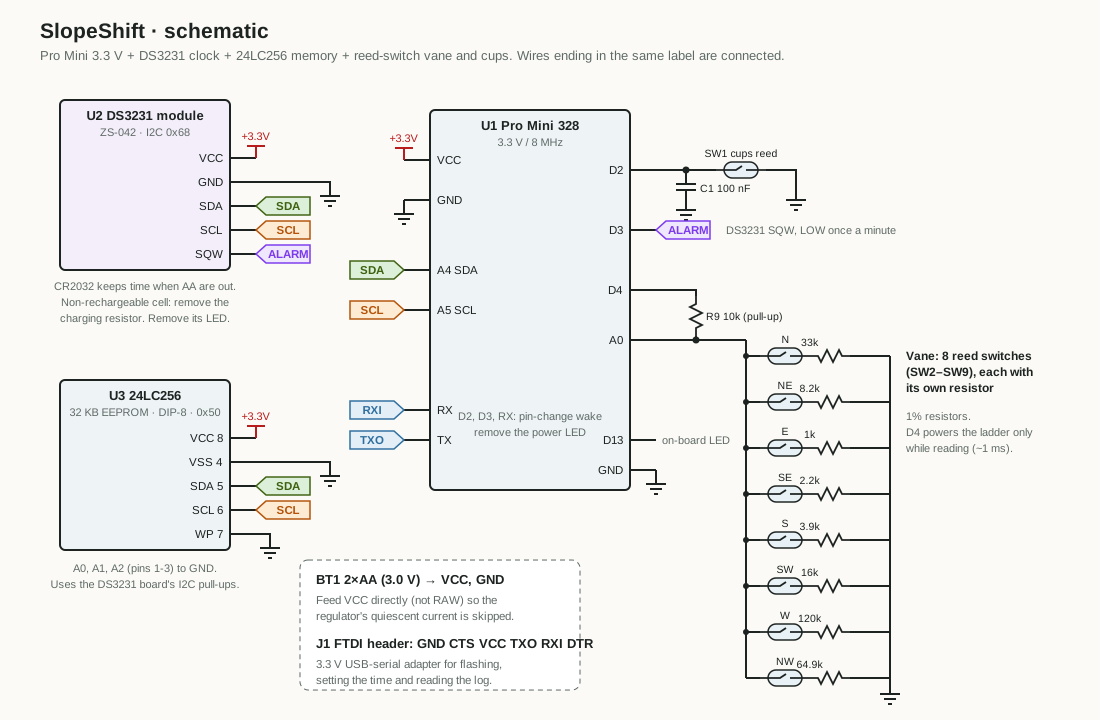
Each switch connects pin A0 to ground through its own resistor. A 10k pull-up, powered from pin D4 only while reading, completes the divider.
| Switch | Resistor | Multimeter should read |
|---|---|---|
| N | 33k | 33.0 kΩ |
| NE | 8.2k | 8.2 kΩ |
| E | 1k | 1.0 kΩ |
| SE | 2.2k | 2.2 kΩ |
| S | 3.9k | 3.9 kΩ |
| SW | 16k | 16.0 kΩ |
| W | 120k | 120 kΩ |
| NW | 64.9k | 64.9 kΩ |
- Measure every resistor before you solder it. Mixing up two values gives wrong directions that are hard to find later. Use 1% resistors: E and ENE are only 9 ADC counts apart.
- Join one lead of all eight switches into a common ground wire.
- Solder each switch's other lead to its resistor. Join the far ends of all eight resistors into a common A0 wire.
- Insulate each joint with heat-shrink or tape.
- Check the ladder. Measure between the A0 wire and the ground wire. With no magnet it should read open (no value). Hold the magnet over N: about 33 kΩ. Between N and NE: about 6.6 kΩ (the two in parallel). Go around the ring.
- Solder the 10k pull-up from D4 to A0 on the Pro Mini.
4. Cups and magnet
- Cut three ping-pong balls in half. You need three halves.
- Fix three equal arms to a hub, 120° apart. Glue a cup to the end of each arm, all open sides facing the same way around the circle.
- Put the hub on its shaft through the second 608 bearing. It should spin for a few seconds after a flick.
- Glue the second magnet to the hub, off-centre, so it passes the cups reed switch once per turn.
- Glue the cups reed switch to the post where the magnet passes over it. Gap: check. Spin it slowly by hand with the multimeter on continuity: one beep per turn.
- Solder the reed between D2 and GND. Solder the 100 nF capacitor across the reed. It stops one closure counting as several.
- Mount vane and cups at opposite ends of a crossbar, at least 30 cm apart, so neither disturbs the other.
5. The housing
Wire the clock and memory to the Pro Mini:
| From | To |
|---|---|
| DS3231 VCC / GND, 24LC256 pin 8 / pin 4 | Pro Mini VCC / GND |
| DS3231 SDA, 24LC256 pin 5 | A4 |
| DS3231 SCL, 24LC256 pin 6 | A5 |
| 24LC256 pins 1, 2, 3, 7 | GND |
| DS3231 SQW | D3 |
| 2×AA holder | VCC and GND (not RAW) |
- Two fixes on the ZS-042 clock module. Remove its power LED. Remove its charging resistor (or use a rechargeable LIR2032), because it tries to charge the coin cell and a normal CR2032 must not be charged. Your teacher can show you which parts on your module; boards vary, so check against a photo of yours.
- Remove the Pro Mini's power LED to save battery.
- Put the boards and battery holder in the 1½" PVC tube. Leave the Pro Mini's six-pin programming header where you can reach it by taking off the top cap.
- Drill a small drain hole in the bottom cap so condensation can escape.
- Run the vane and cups wires along the crossbar and down the mast into the tube. Seal where wires enter with hot glue.
6. Flash the firmware
- Install the Arduino IDE. No extra libraries are needed.
- Open
slopeshift.ino(in thefirmware/slopeshiftfolder of the kit files). - Choose Board: Arduino Pro or Pro Mini, Processor: ATmega328P (3.3V, 8 MHz).
- Switch the AA holder off. Connect the 3.3 V USB-serial adapter to the six-pin header (GND to GND, matching the pin labels). Use 3.3 V only; a 5 V adapter can damage the clock and memory.
- Click Upload.
7. Set the clock: time
- Open the Serial Monitor at 9600 baud, line ending Newline.
- Press Enter to wake it. It prints
slopeshift readyand a list of commands. It goes back to sleep after 30 seconds with no typing. - Type the local time, 24-hour, at the moment you press Enter:
time 2026-10-21 14:05. It answersok, logging from the next minute. - Type
statusand check the time is right.
The clock has no daylight saving. Set it to the time you'll use when reading the data. The tools fix the time zone later.
8. Calibrate speed: k
Speed = cup turns per second (Hz) × k. The default is 1.492 mph per Hz, which fits SparkFun's cups, not homemade ones. To find yours:
- On a calm day, a teacher or another adult drives at a steady 10 mph on a quiet, safe road. A student in the passenger seat holds the cups out of the window, well clear of the car, and runs
live. - Write down the Hz readings. Repeat at 20 mph.
- k = mph ÷ Hz at each speed. Average them.
- Save it:
k 1.85(use your number). It's stored in memory and kept when the battery is out. Values from 0.1 to 20 are accepted.
No car? Compare against a handheld anemometer in front of a fan, at two or three distances. Or leave the default: switch times come from direction, so they don't need an exact speed.
9. The live check
Type live. Every 2 seconds for 30 seconds it prints the direction, the raw reading (adc), the cup rate in Hz and the speed:
Turn the vane slowly through all 16 directions and compare with this table. Within a few counts is fine.
| Dir | adc | Dir | adc | Dir | adc | Dir | adc |
|---|---|---|---|---|---|---|---|
| N | 785 | E | 93 | S | 287 | W | 944 |
| NNE | 406 | ESE | 66 | SSW | 244 | WNW | 827 |
| NE | 461 | SE | 184 | SW | 630 | NW | 886 |
| ENE | 84 | SSE | 126 | WSW | 599 | NNW | 702 |
Then spin the cups by hand: Hz should rise and fall with speed.
Classroom demo: fast. Point a fan or hairdryer at the vane. Type fast: it prints s,dir,deg,mph every 2 seconds. After 10 seconds it knows the "before" wind. Move the fan to the other side and hold it there. About 8 seconds later it prints a line like # switch at 34 s: NW -> SE and blinks three times. That's the same rule the tools use on a real day, sped up. Press any key to stop. Logging carries on underneath. You can paste the lines into a spreadsheet and chart them.
10. Deploy it
- Put the logger up a week or more before you need the data. A memory chip holds about 20 days.
- Mount it on a stake or tripod at the height you care about, clear of trunks, walls and branches. They bend the wind.
- With the phone compass, turn the whole crossbar so that when the pointer faces north, the magnet sits over the N switch.
- Switch the AA holder on. Watch the LED:
- 2 slow blinks: logging. Good.
- 5 fast blinks: the clock isn't set. Run
time. - 8 fast blinks: memory full. Read the log, then
clear yes.
- Note the place, latitude and longitude, the slope angle and the direction it faces. The Analyzer needs these.
- Leave it. To collect, type
dumpin the Serial Monitor and save the text as a.csvfile, or use the kit's Python tool:slopeshift.py read --port /dev/ttyUSB0 -o wind.csv. Then load the file into the Analyzer.
11. Troubleshooting
| Problem | Likely cause | Try |
|---|---|---|
| Nothing in the Serial Monitor | Wrong baud, asleep, or TX/RX swapped | 9600 baud, press Enter, check the adapter wiring |
| Upload fails | Wrong board or processor | Pro Mini, ATmega328P 3.3V, 8 MHz |
Direction always ? | No switch closed (adc above 1000) or a short (adc below 20) | Check the A0 and ground wires, the D4 pull-up, the magnet gap |
| Direction jumps between neighbours | Magnet too far or too close, or a 5% resistor | Adjust the gap; measure the resistors |
| Directions rotated (east reads as south) | Magnet arm not lined up with the pointer, or switches in the wrong order | Re-check the ring labels clockwise from above |
| One direction never shows | A cracked reed or cold joint | Continuity test that switch |
| Hz always 0 | Cups reed too far from the magnet, or not on D2 | Spin by hand with the multimeter on continuity |
| Speed reads double | Two closures per turn | Use one magnet; move the reed so it closes once |
| 5 fast blinks every time | Clock lost power (dead CR2032) | New coin cell, then time |
| Log stops early | Batteries flat or memory full | status shows memory used and days left |
Still stuck? Write down what status and live print and ask your teacher.