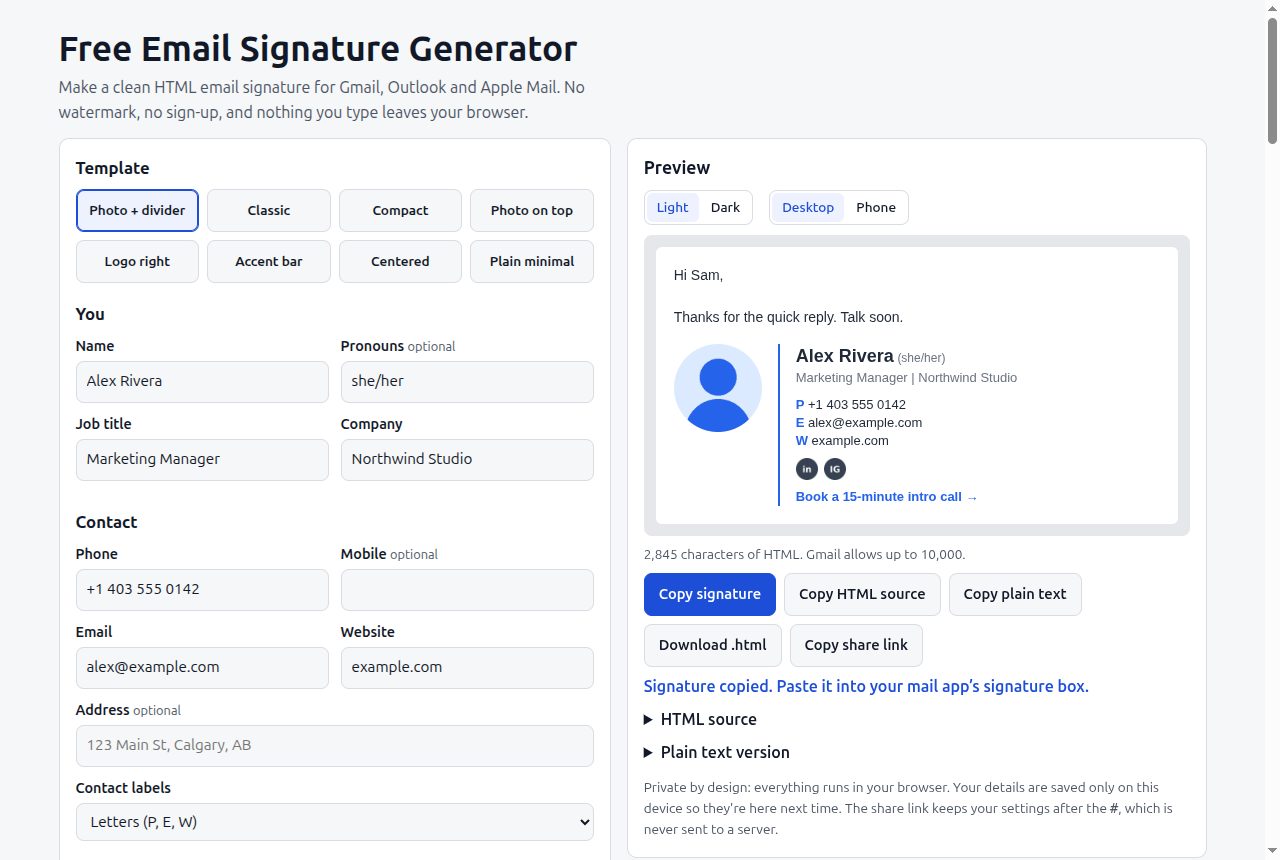
An email signature is a tiny web page that has to survive some of the least predictable renderers still in daily use. Classic Outlook for Windows draws email with Microsoft Word’s layout engine, not a browser. Gmail strips anything it doesn’t trust. Phone apps reflow everything to a narrow column. A signature that looks right in the editor that built it can arrive with square “round” photos, missing images, collapsed spacing or a mystery image001.png attachment on every message.
I built this generator because the free ones I tried wanted my email address first, slipped their own “made with” link into my signature, and kept the good templates behind a trial. This one has eight templates, no sign-up and no watermark, and everything you type stays in your browser. Most of the work went into making the HTML it produces boring enough to survive every client.
Why signatures break, and what the generator does about it
Layout: tables, not CSS
Word’s renderer supports only a narrow slice of CSS, and modern layout isn’t in it. So every template is built from nested <table>s with cellpadding="0" cellspacing="0" border="0" and border-collapse:collapse, which is still what renders the same in Outlook, Gmail, Apple Mail and phone apps. Tables also carry role="presentation" so screen readers don’t announce them as data tables.
Some smaller choices follow from the same constraint:
- Dividers are table cells. The vertical accent line in the “Photo + divider” template is a 2 px-wide
<td>with a background colour, and the accent bar template uses a 4 px-high row the same way, so the line is part of the table structure rather than a CSS decoration. - Spacers are explicit. Vertical gaps are
<div>s with a fixed height andfont-size:0; line-height:0, so a client’s default font can’t inflate an empty line into a 20 px gap. - Whitespace is stripped. The generated HTML has its line breaks and indentation removed, so there’s no stray whitespace between cells for a client to render.
Styling: inline, every time
There is no stylesheet to lose. Every element carries its own style attribute with font family, size, colour and line height (1.4) written out in full. Fonts are limited to eight email-safe stacks, such as Arial, Helvetica, sans-serif and Georgia, 'Times New Roman', serif, so there’s always a fallback the recipient actually has. Base font size is clamped to 11 to 16 px.
Images get display:block; border:0 and their size twice, as HTML width/height attributes and as CSS, so a client that ignores one still has the other. Round photos use border-radius, which works in Gmail and Apple Mail; the page says plainly that classic Outlook ignores it and that the fix is a photo already cropped into a circle as a transparent PNG.
Images: hosted links only, on purpose
There is no upload button. Email clients load signature images from a URL every time a message is opened. Generators that embed images as base64 data URIs look fine in their preview, then Gmail strips the image and Outlook blocks it or turns it into an attachment. So the generator only accepts https:// image links, and it checks what you paste:
data:URIs: explains why they get stripped or attached, and leaves them out.http://links: warned, because most clients block or break insecure images.- Google Drive or Dropbox share links: warned, because they open a viewer page, not the image file.
The social icons have the same problem, so the generator ships its own: 49 PNGs (seven networks in seven colours) served from the tool’s own site. They are rendered at 96 × 96 and displayed at 22 × 22, so they stay sharp on high-density screens. They’re plain letter marks I generated with a small Pillow script, not the official logos.
Size: Gmail’s 10,000 limit
Gmail refuses signatures over 10,000 characters, the only hard number any of the clients publish. Inline styles are verbose, so the tool counts the generated HTML live and turns the counter red if you go over.
Getting it into the mail app
The Copy signature button writes two formats to the clipboard at once through ClipboardItem: text/html and a text/plain fallback. Pasting into Gmail, Outlook or Apple Mail’s signature box then gives formatted content, not source code. Older browsers fall back to selecting the rendered preview and copying that. You can also copy the raw HTML, copy a plain-text version (for Gmail’s text-only mobile signature), or download a standalone .html file. The page has step-by-step install instructions for Gmail, new Outlook, Outlook on the web, classic Outlook, Apple Mail and iPhone.
Design decisions
Private by default. No server, analytics or cookies. Your details are saved in local storage. The share link encodes only the fields that differ from the example, as base64url after the #, so it never reaches a server.
Safe links. Website and call-to-action links refuse javascript: and data: schemes, and every field is HTML-escaped before it goes into the signature.
A plain option. The “Plain minimal” template has no images at all and forces social links to text, for mail servers that block remote images.
Limits
- The repo has no automated cross-client rendering tests. The techniques are the standard ones for email HTML, but clients still vary by version.
- The dark preview puts the signature on a dark background. It doesn’t reproduce the colour inversion that Outlook, Gmail’s apps and Apple Mail apply, which differs between clients.
- The character count is the length of the HTML string the tool generates. Gmail may count the pasted signature slightly differently.
- Images rely on you hosting them somewhere public and stable. If that link breaks, the image breaks in every email already sent.
- The width, photo, logo and file-size guidance on the page are common recommendations, not official limits.
Build one with the example data first to see the templates, then swap in your own details.