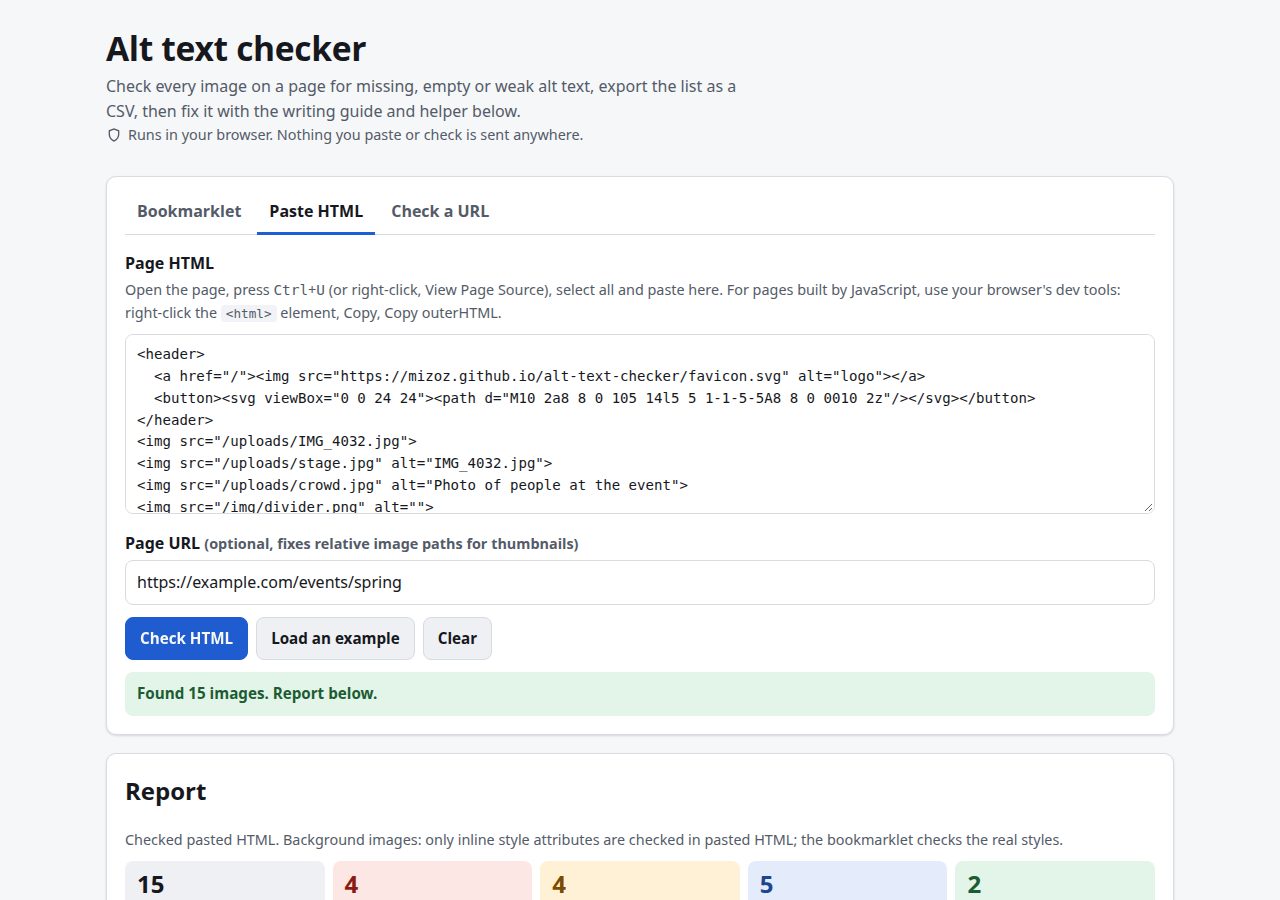
Every time I checked an event or campaign page for accessibility, I ended up opening dev tools and going through <img> tags one by one. Half the alt text was IMG_4032.jpg, the other half was image, and a few icon links had nothing at all. A screen reader user hears exactly that: a file name, the word “image”, or a link announced as a URL.
The Alt Text Checker does that pass in a couple of seconds. Drag it to your bookmarks bar, click it on any page (including pages behind a login), and a panel lists every image with errors, warnings and notes. “Show on page” scrolls to an image and outlines it, and the list can be downloaded as a CSV. You can also paste HTML or try a URL.
It is built around one distinction that most quick checks blur: a missing alt attribute is a different thing from an empty one. WCAG 2.2 Success Criterion 1.1.1 (Level A) asks for a text alternative that serves the same purpose as the image, and asks that decoration be hidden from assistive technology. For an <img>, alt="" is the correct way to say “decorative”. So the checker flags a missing attribute as an error, but treats an empty one as a decision you are allowed to make, unless the image is the only content of a link.
What it checks
The audit covers <img>, <input type="image">, <area> with an href, top-level inline <svg>, any element with role="img", and CSS background images. Anything with aria-hidden="true" or hidden on itself or an ancestor is marked OK and skipped, since screen readers won’t reach it.
For an <img>, the decision goes roughly like this:
| Situation | Result |
|---|---|
No alt, only content of a link or button |
Error: the link has no name |
No alt, not in a link |
Error (a note instead if it has aria-label) |
alt="", only content of a link |
Error: describe the destination |
alt="", link already has text |
OK |
alt="" on its own |
Note: decorative, fine if it really adds nothing |
role="presentation" with non-empty alt |
Warning: pick one |
Tiny image (2 x 2 px or smaller) with alt="" |
OK, probably a tracking pixel |
To decide whether a link already has a name, it computes a simplified accessible name. It looks at aria-label, then aria-labelledby, then the text inside the link (counting nested image alt text and SVG <title> elements, and skipping aria-hidden content), then title.
When alt text is present, the text itself is checked with a few patterns:
- File names: an image extension (
.jpg,.webp,.heic…), camera-style names (IMG_4032,DSC0012,PXL_...), or a run of 16 or more hex-like characters. Alt text identical to the file name insrcis flagged too. - Generic words: a whole-string match against words like
image,photo,logo,icon,banner,spacer,placeholder,untitled,null,undefined, or one to three punctuation characters. - Redundant prefixes: “image of”, “photo showing”, “picture depicting” and similar. Screen readers already announce the image, so the prefix adds nothing (unless the medium matters, as in “Oil painting of…”).
- Length: over 125 characters. WCAG sets no limit, and the page says so. 125 is a common rule of thumb, used here as a prompt to move detail into a caption.
- Repetition: alt text that matches the surrounding link text or the
<figcaption>gets read twice. The same alt on images with different sources is noted (“fine for repeated icons; photos usually need their own”).
SVGs need a name from aria-label or a direct <title> child. An unnamed SVG that is the only content of a button is an error. One inside a link that already has text should get aria-hidden="true". Image buttons need alt, aria-label or value. CSS backgrounds can’t have alt text at all, so each one 40 x 40 px or larger is listed as a note: if it carries meaning, that meaning needs to be real text.
Each image takes the severity of its worst finding: error, then warning, then note, then OK.
A worked example
The built-in example is a 17-line event page snippet. It produces 15 items: 4 errors, 4 warnings, 5 notes and 2 OK.
- The errors are an image with no
alt, an icon-only search button whose SVG has no name, a tickets link whose only content is an image withalt="", and an<input type="image">with no text. - The warnings are
alt="logo"(generic),alt="IMG_4032.jpg"(a file name), “Photo of people at the event” (a prefix), and a 171-character description of a standing ovation (long). - The notes are a decorative divider, a chart whose alt matches its caption, two speaker photos both labelled “Speaker” (duplicate), and a hero banner set as a CSS background.
How it fetches pages
There is no server. The checks live in one file, audit.js, and run three ways:
- Bookmarklet. The three audit functions are turned back into source code with
Function.prototype.toString, joined, and URL-encoded into ajavascript:link of about 32,500 characters. That is why the audit code has to be self-contained, with no outside variables and no line comments. On the live page it reads computed styles for background images (it scans up to 6,000 elements and reports at most 150), real image sizes, andcurrentSrc. The results panel lives in a shadow root, so the page’s CSS can’t break it. Escape closes it, and “Outline on page” draws a coloured border around each image according to its severity. - Paste HTML. The HTML is parsed with
DOMParser, so pasted scripts never run. Relative image paths are resolved against a page URL you supply, or one found in<base>, the canonical link orog:url. Only inline-style backgrounds can be seen this way. - Check a URL. A direct CORS
fetchwith a 15-second timeout. Most sites block cross-origin reads, and when that happens the tool says so plainly and points to the bookmarklet or View Source. It doesn’t pretend the check ran.
The alt text helper
The helper doesn’t use image recognition. A model can say what is in a photo. It can’t say why the photo is on that page, and that is what alt text depends on. Instead, the helper asks what the image is doing (decorative, informative, a link or button, text in an image, a chart, a logo) and drafts alt text from your answers. A chart becomes “type: takeaway. Full numbers in…”. A linked logo becomes “Name home”. The draft is then run through the same audit, so the helper reviews its own output.
Limits
- It can’t tell you whether a description is good. It catches the mechanical failures. Whether “Volunteers handing out programs at the theatre entrance” says what matters in context is still a human call.
- The patterns are English only, and the generic-word list is short. In the example, “Speaker” is caught only because it appears twice, not because it is vague.
- The accessible-name logic is a simplification of the full specification, and it doesn’t enter iframes or the shadow DOM of web components.
- URL mode sees only the HTML the server sends. Images added later by scripts appear only with the bookmarklet.
- It covers SC 1.1.1 and the image parts of 2.4.4 and 4.1.2. It isn’t a full accessibility audit.
Everything runs in your browser, with no account, analytics or cookies. Thumbnails load directly from wherever the images are hosted, and you can turn them off.