Every launch I’ve worked on had the same moment. Someone shares the link, the preview shows the wrong image (a cookie banner logo, or nothing at all), and then we find out LinkedIn has cached it. The fix is nearly always a handful of <meta> tags. Finding which one is wrong is the slow part.
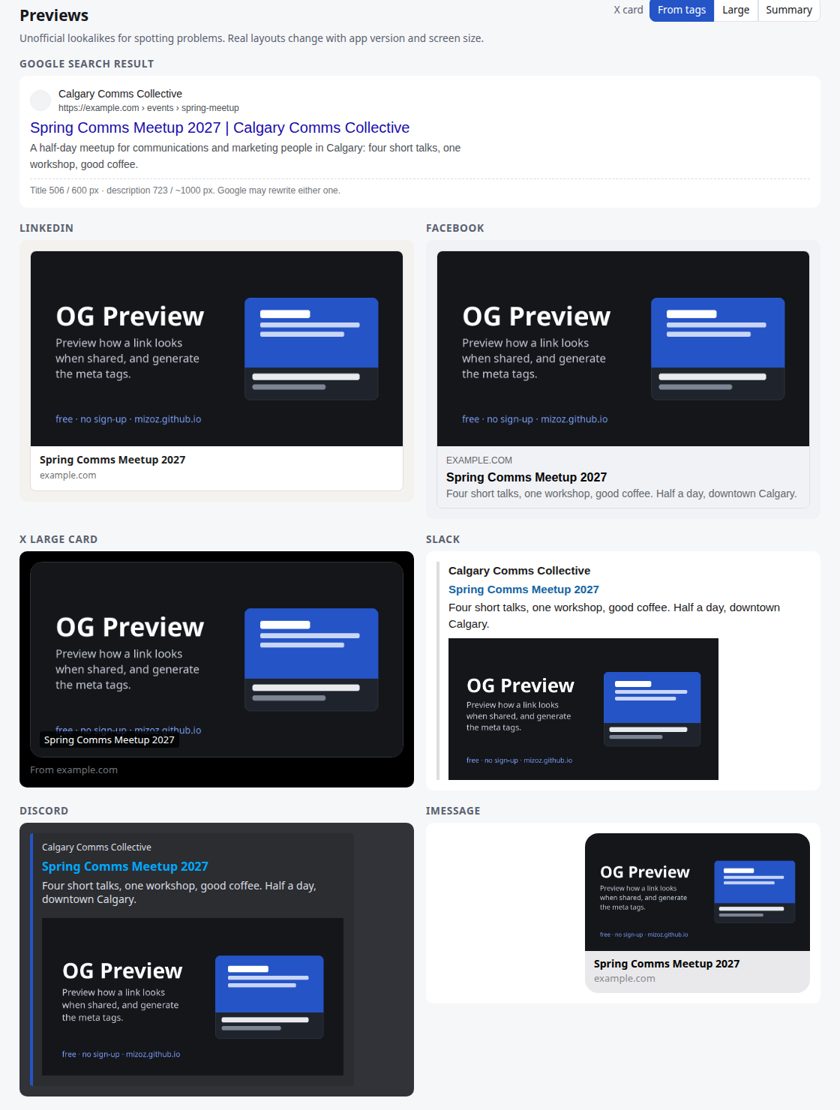
The existing checkers either want a sign-up, fetch your page through their own server, or show only one platform. This one shows lookalike previews for a Google result, LinkedIn, Facebook, X (large and summary cards), Slack, Discord, iMessage and WhatsApp side by side, from one paste of HTML. It lists every problem with the exact tag that fixes it, and includes a generator that writes a clean <head> snippet.
The useful idea is that each app reads the same small set of tags but falls back differently when one is missing. A page can look fine on Facebook and broken on X for that reason alone, so the checker resolves the tags the way each platform does.
How it works
Getting the HTML from a static page
This is a static site with no backend, which limits how it can read another site’s page. A browser won’t let one origin read another origin’s HTML unless that site sends CORS headers, and most don’t. The tool still tries a direct fetch (CORS mode, no cookies, 12-second timeout), and if the site allows it, it says so. When the fetch is blocked, the tool explains that this is a browser rule, that it doesn’t affect LinkedIn or Facebook (their crawlers run on servers), and offers two other routes:
- Paste the page source, or just the
<head>. It is parsed withDOMParser, so none of the page’s scripts run. - Use the bookmarklet on the live page. It collects the
<title>, every<meta>, the canonical, icon and alternate<link>tags and any JSON-LD (capped at 60,000 characters). It then opens the checker with that data in the URL fragment (#u=...&h=...). Browsers never send the fragment to a server, so the tags go from your tab to mine without passing through anything in between. This also works on pages behind a login.
I decided not to run a proxy. A proxy would make “Fetch” work every time, but it would also mean a server of mine sees every URL people check, and that cost felt too high.
Resolving the tags per platform
After parsing, the tool works out what each app would display:
| Field | Facebook, LinkedIn, Slack, Discord, iMessage, WhatsApp | X |
|---|---|---|
| Title | og:title, then twitter:title, then <title> |
twitter:title, then og:title, then <title> |
| Description | og:description, then twitter:description, then meta description |
twitter:description first, then the same chain |
| Image | og:image (or og:image:url, og:image:secure_url), then twitter:image |
twitter:image, then og:image |
Relative URLs are resolved against, in order: the page URL you typed, og:url, the canonical link, and a <base href> if the page has one. If there is no favicon link, the tool falls back to /favicon.ico.
The layout of each preview depends on what was resolved:
- LinkedIn shows the image large only when it is at least 401 px wide. Below that it becomes a thumbnail.
- Facebook shows it large at 600 x 315 or bigger, small otherwise.
- X draws the large card only when
twitter:cardissummary_large_image. Otherwise it draws the summary card with a square crop. A toggle lets you force either layout. - Slack and Discord show the big image only for
summary_large_imageand use a thumbnail otherwise. Discord’s embed bar takes its colour fromtheme-color. - WhatsApp shows the large layout when the image is at least 300 px wide.
Image rules
The tool loads the image in the browser and measures its real naturalWidth and naturalHeight. It doesn’t rely on the declared size tags.
| Condition | Result |
|---|---|
| Either side under 200 px | Fix: below Facebook’s 200 x 200 minimum |
| Under 1200 x 627 | Check: below LinkedIn’s stated minimum (and a thumbnail if under 401 px wide) |
| Ratio more than 0.12 away from 1.91:1 | Check: will be cropped, heavily if under 1.5:1 |
twitter:card is summary and the image isn’t square |
Tip: X crops it to a small square |
og:image:width/height disagree with the real size |
Check: correct or remove them |
| File over 5 MB | Fix: over LinkedIn’s and X’s cap |
| File over 300 KB | Tip: WhatsApp often skips large preview images |
File size is read from a CORS HEAD request, so it only appears when the image host allows one. The URL itself is checked too: relative, protocol-relative (//), http: and data: image URLs are each flagged, because crawlers may not resolve them.
Measuring titles in pixels
Google cuts titles by width, not by character count. The checker draws the title on a hidden canvas in 20 px Arial and finds the longest prefix that fits in 600 px, plus an ellipsis, using a binary search over measureText. It then backs up to the last space if that space is in the final 40% of the cut. Descriptions get the same treatment at 14 px within about 1,000 px, which is roughly two lines.
In the built-in example, the title “Spring Comms Meetup 2027 | Tickets, Speakers and Schedule | Calgary Comms Collective” is 84 characters and about 809 px wide. The tool reports that Google cuts it after about 59 characters. The same example also triggers four other checks: two og:title tags, no twitter:card, no canonical, and no image dimension tags.
Other checks
Missing or duplicate <title>, missing descriptions, more than one canonical, og:url that differs from the canonical, duplicate meta tags (og:image, article:tag and others that may legitimately repeat are allowed), Open Graph tags written with name= instead of property=, an unknown twitter:card value, noindex, a missing favicon, and JSON-LD that fails to parse. Results are sorted into Fix, Check, Tip and OK.
Generator
The generator writes title, description, canonical, Open Graph, twitter:card and theme-color tags. It then runs the generated snippet back through the same parser and checks, so the warnings describe exactly what you are about to copy. “Fix in generator” pre-fills it from a page you checked. You can test a local image to see its previews and size checks before uploading it, and the image stays on your device. The filled-in form can be shared as a link, also stored in the URL fragment.
Limits
- The previews are lookalikes for spotting problems, not official renderings. Real layouts change with app versions and screen sizes.
- Google’s roughly 600 px title and two-line description cutoffs are observed behaviour, not published numbers, and Google may rewrite either one. Pixel widths also depend on the Arial or metric-compatible font installed on your machine.
- Discord, WhatsApp, Slack and iMessage don’t publish image sizes, so the tool gives a recommendation for them rather than a rule.
- The bookmarklet reads the page after its scripts have run. If your tags are added by JavaScript, check View Source as well, because most crawlers don’t run scripts.
- It can’t see what a crawler sees from your server: bot blocking, user-agent-specific responses or redirects are invisible to it.
- Platforms cache previews. The page links to the LinkedIn Post Inspector and the Facebook Sharing Debugger for re-scraping. X, Slack, Discord, iMessage and WhatsApp have no public refresh tool.
Platform numbers were checked against Facebook, LinkedIn and X developer documentation on 2026-10-21. The tool runs entirely in your browser, and the source is a single plain JavaScript file.