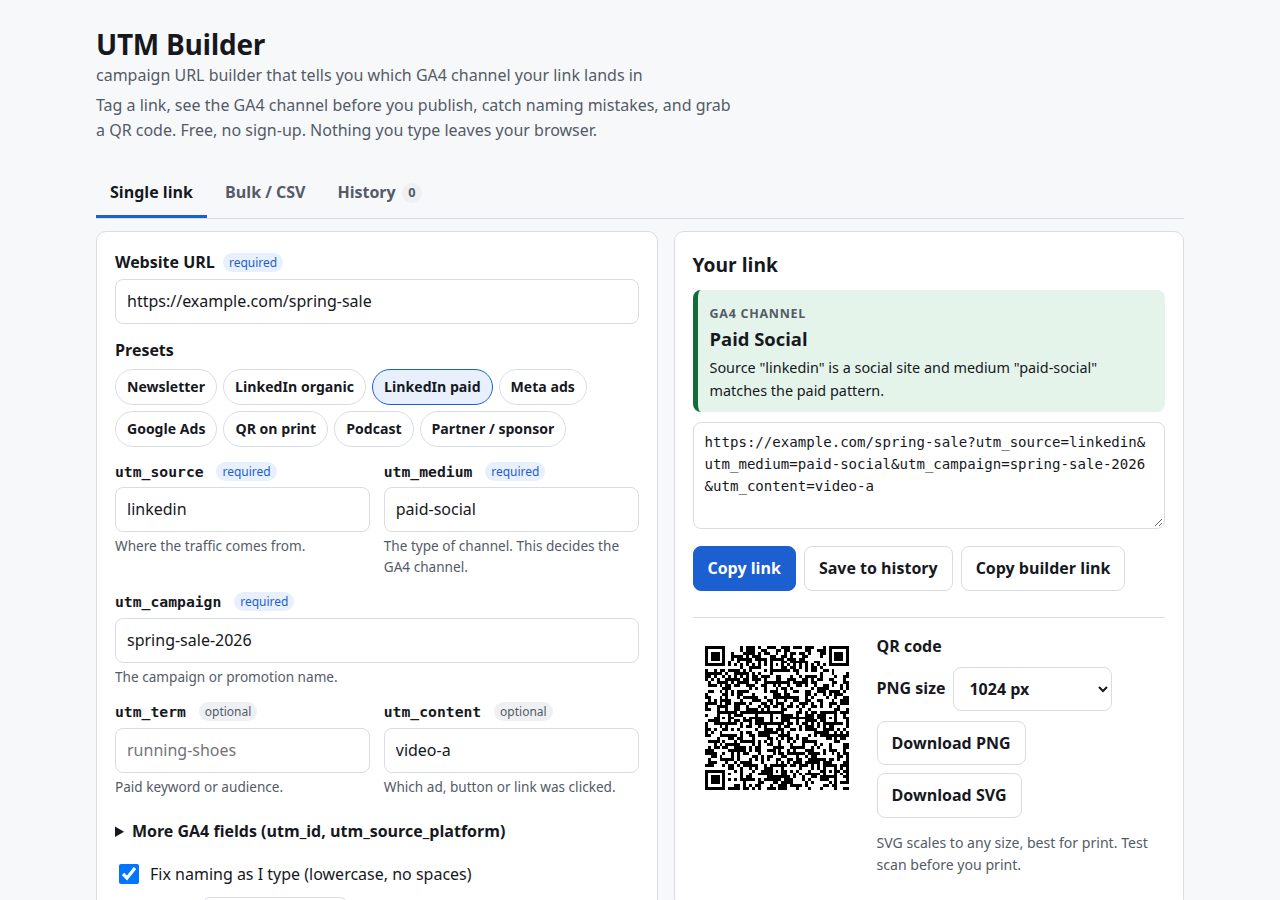
I kept finding campaign traffic sitting in “Unassigned” in GA4. One person had used utm_medium=newsletter, another Email, and the QR code on the poster said qr. Google’s own Campaign URL Builder builds all of those without comment, because it only joins strings together. It has no idea what GA4 will do with them.
GA4 does have an opinion, and it is written down: the default channel group is an ordered list of rules over source, medium and campaign name, and the first rule that matches wins. So the useful thing for a builder to do is run those rules on your values as you type and show the result. That is what this tool does. Next to the tagged URL sits a badge that names the channel (Email, Paid Social, Referral, Unassigned) and the rule that put it there.
It is for anyone who tags links for newsletters, social posts, ads, sponsors or print, and wants the report at the end of the month to match what they meant.
How it works
The channel rules
The classifier is one function that checks the rules in the same order as Google’s documented default channel group, against lowercased source, medium and campaign. A condensed version of the order:
| Order | Channel | Condition (simplified) |
|---|---|---|
| 1 | Cross-network | campaign contains cross-network |
| 2 | Paid Shopping | shopping source, or shopping campaign, plus a paid medium |
| 3 to 5 | Paid Search / Social / Video | search, social or video source plus a paid medium |
| 6 | Display | medium is display, banner, expandable, interstitial or cpm |
| 7 | Paid Other | paid medium, source not recognised |
| 8 to 11 | Organic Shopping / Social / Video / Search | same source lists, or mediums like social, anything containing video, organic |
| then | Email, Affiliates, Referral, Audio, SMS, Mobile Push | exact matches such as email, affiliate, referral/app/link, audio, sms, or a medium ending in push |
| last | Unassigned | nothing matched |
“Paid medium” is a regular expression: ^(.*cp.*|ppc|retargeting|paid.*)$. Anything containing cp (cpc, cpm, cpv) or starting with paid counts. social-ads does not, which is one of the most common ways paid social ends up reported as organic.
The shopping campaign pattern is the subtle one: ^(.*(([^a-df-z]|^)shop|shopping).*)$. “shop” counts when it starts the name or follows a character that isn’t a letter from a to d or f to z. So workshop and photoshop are safe, but eshop-launch, summer-shop and e-shop are not. Because Paid Shopping is checked second, a LinkedIn paid campaign called eshop-launch is classified as Paid Shopping rather than Paid Social. The builder spots this case and suggests renaming the campaign.
Worked examples
These are real outputs from the tool:
example.com/pricing, sourcenewsletter, mediumnewsletter: the builder addshttps://, and the badge reads Unassigned. “No default channel rule matches medium newsletter.” It offers a one-click fix tomedium = email.- Source
facebook, mediumsocial ads: as you type, the space becomes a hyphen. The badge reads Organic Social, with the warning thatsocial-adssounds paid but doesn’t match the paid pattern. The suggested fix ispaid-social. - Source
linkedin, mediumpaid-social, campaigneshop-launch: Paid Shopping, with a warning about the word “shop”.
Naming normalisation
GA4 matches channel rules case-insensitively but reports values exactly as written, so Facebook and facebook become two rows. The builder cleans names in two passes:
- While you type, it lowercases and turns whitespace into your separator without changing the string’s length, so the cursor doesn’t jump.
- When you leave the field, it does the full clean: lowercase, spaces and the other separator converted to
-or_(you choose), anything outsidea-z 0-9 . _ ~ + -removed, repeated separators collapsed, and separators trimmed from both ends.
Ad platform macros are left alone in both passes. The input is split on and `{...}`, so Meta's and Google Ads’ {keyword} keep their case and braces. When the URL is encoded, { and } are deliberately left unencoded so the platforms can still replace them.
It also catches spelling drift across your own history. Values are compared with case, spaces, hyphens and underscores removed. If you once saved spring_sale and now type Spring-Sale, it suggests the earlier spelling. Bulk mode runs the same comparison between rows of a single batch.
URL handling
Existing query strings and #fragments stay where they belong: new tags go before the hash. Any utm_* parameters already on the URL are replaced, not duplicated, and the tool tells you. Click IDs (gclid, fbclid, msclkid, ttclid, li_fat_id and others) are flagged, because they are added per click and shouldn’t be shared. Short links such as bit.ly are flagged too: tag the destination first, then shorten. Links over 2,000 characters get a warning.
QR codes
QR codes use Kazuhiko Arase’s qrcode-generator, version chosen automatically, error correction level M, byte mode, with a 4-module quiet zone on each side. The SVG is one path of 1x1 squares on a white background, drawn with crispEdges, so it stays sharp at any print size. For the PNG, the module size is a whole number of pixels, floor(requested size / (modules + 8)), which avoids blurry edges.
Take https://example.com/events/spring-meetup?utm_source=flyer&utm_medium=print&utm_campaign=spring-meetup-2027. At 106 characters it produces a 41 x 41 code (version 6). With the quiet zone that is 49 modules, so the “1024 px” PNG comes out at 20 px per module, 980 x 980. The “2048 px” option gives 2,009 x 2,009. For links over 300 characters the tool suggests printing the code at least 3 cm wide and test-scanning it first.
Design decisions
- Everything in the browser. No server, no analytics, no cookies. History (up to 300 links) and your last inputs are kept in localStorage. The only external request is the QR library from cdnjs, pinned with a subresource integrity hash.
- The form state lives in the page URL under short keys (
u,s,m,cand so on). “Copy builder link” sends a teammate the exact setup. - Presets that classify correctly. Newsletter is
newsletter / email, and LinkedIn paid islinkedin / paid-social. Meta ads fills in,and ``. Google Ads fills in ValueTrack macros, with a note that auto-tagging is better when Ads is linked to GA4. - Honest about print. GA4 has no print or QR channel, so
print,flyerorqralways end up in Unassigned. The tool says so rather than suggesting a medium that misrepresents the traffic. It recommends keeping one value and mapping it to an “Offline” channel with a custom channel group. - CSV safety. Exported cells that start with
=,+,-or@get an apostrophe in front, so a spreadsheet won’t run them as formulas. - Left out on purpose:
utm_creative_formatandutm_marketing_tactic. GA4 accepts them, but Google says they aren’t reported yet.
Limits
- Google classifies sources using long downloadable lists of search, social, video and shopping sites. The builder includes the common ones (17 search engines, 32 social sites, 10 video sites and 16 shopping sites), not the full lists. An obscure paid source may show as Paid Other here and something more specific in GA4.
- Only the default channel group is modelled. Custom channel groups in your property are invisible to it.
- It predicts classification. It can’t see your GA4 property, so redirects that strip parameters or consent settings that drop sessions aren’t detected.
- The rules were checked against Google’s documentation on 2026-10-21. If Google changes them, the code has to be updated by hand.
The builder is free to use, and the source is a single file of plain JavaScript if you want to check the rules yourself.