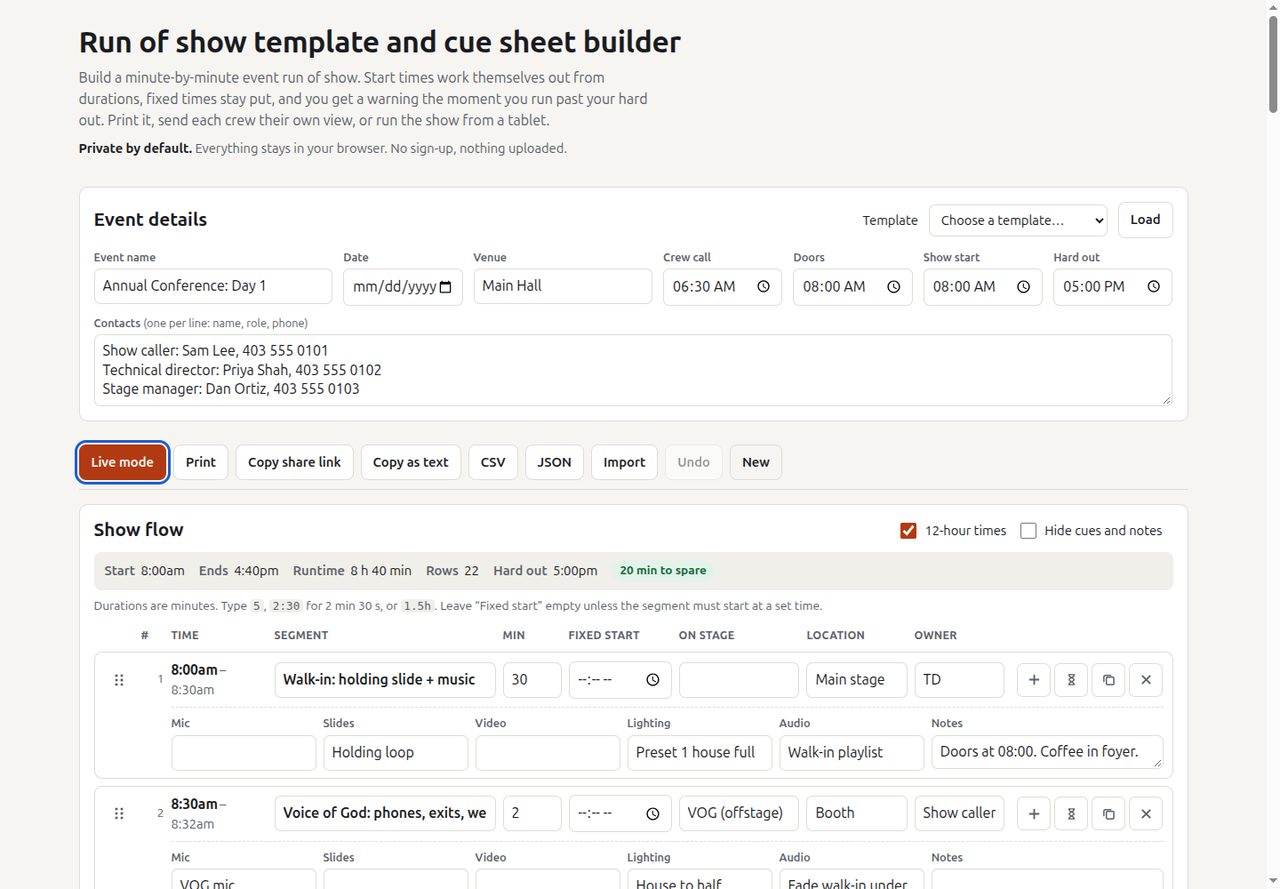
A run of show is the document everyone at an event reads from: who is on stage, what the AV crew does, and when. Every one I’ve worked from was a spreadsheet where someone changed one duration and forgot to fix the twenty start times under it. The schedule looked right and was wrong.
Run of Show Builder flips the model. You type durations, not times, and the times are derived. Then you pin the few things that genuinely can’t move, such as lunch service, a broadcast slot or the venue curfew, and the tool shows you exactly where the flexible part of the day collides with the fixed part. That collision is the information a producer actually needs, and a spreadsheet hides it.
It’s for event producers, stage managers and comms teams running conferences, galas, launches and live stream shows.
How it works
The cascade
The schedule is a single pass over the rows. It starts at the show start time and walks down:
start(row) = fixed time, if the row has one
           = end(previous row), otherwise
end(row)   = start(row) + duration
gap(row)   = fixed time − end(previous row)   (anchored rows only)
A positive gap is dead air before a pinned segment. A negative gap is an overlap: the material before it no longer fits. Rows below an anchor cascade from the anchor’s end, not from wherever the overrun would have pushed them. So a pinned row acts as a firewall: a slip in the morning shows up as one red “overlaps by” flag at the next anchor rather than silently shifting the whole afternoon.
The conference template shows it working. Show start is 08:00, the hard out is 17:00, and the morning break is pinned at 10:15. Walk-in, VOG, opener, MC, keynote, Q&A, a 3-minute changeover and a 40-minute panel add up to 130 minutes, so the panel ends at 10:10 and the break row reads “5 min gap before”. Lunch is pinned at 12:00 and the rows before it land exactly on 12:00. The day ends at 16:40, and the status bar says “20 min to spare”.
Now say the keynote Q&A runs 10 minutes long. Change its duration from 10 to 20 and the panel ends at 10:20. The break stays at 10:15 and its row now reads “overlaps by 5 min”, the status bar gains a “1 fixed time overlapping” pill, and nothing after the break moves. You can then decide where those 5 minutes come from: trim the panel, eat the buffer, or move the anchor.
Any row that ends after the hard out is tinted and flagged “past hard out”, and the status bar shows how far over you are.
A few details that matter at real events:
- Durations parse loosely.
5is five minutes,2:30is two and a half,1:05:00is h:m:s, and1hor90swork too. - Overnight events work. A pinned time more than six hours before show start is treated as the next day, and a hard out at or before show start rolls past midnight, so a 22:00 to 02:00 show calculates correctly.
- Buffers are their own row type. Changeovers and holds are visible as time in the plan instead of being padded invisibly into segments.
- Duplicating a row drops its fixed time, so you don’t accidentally create two segments pinned to the same minute.
Live mode
Live mode is a full-screen view for the stage manager’s tablet: current segment, a large countdown, a progress bar, the cue chips (mic, slides, video, lighting, audio), notes, and what’s next. It has two ways to run.
Manual (GO per cue). The caller presses GO (or space, right arrow, Page Down) to advance. Each press records how long the finished segment actually ran. Drift is then:
drift = Σ (actual − planned) for finished segments
      + max(0, elapsed − planned) for the current one
The current segment only adds to drift once it has run over, so the display doesn’t claim you’re ahead just because a segment has started. The countdown turns amber in the last 60 seconds and red when it goes negative (shown as +0:45). The drift line reads “Running 3:20 over” or “1:10 ahead of plan”, amber when over and red past a minute.
Follow the clock. The view works out which segment should be on now from the planned times and the wall clock, including counting down to show start and showing gaps before pinned segments. Useful for a screen in the green room or for a show that runs strictly to time.
The screen requests a wake lock so the tablet doesn’t sleep mid-show, and re-requests it when the tab comes back into view.
Storage, sharing and print
Everything is saved to localStorage, debounced by 250 ms. Live mode state (current cue, when it started, actual durations so far) is saved separately, so if the tablet browser reloads mid-show, the countdown picks up from the real start time. Undo keeps the last 60 changes, and opening a shared link or loading a template is itself undoable.
Share links carry the whole run of show in the URL fragment. The state is packed as column keys plus row arrays, compressed with the browser’s built-in CompressionStream('deflate-raw') and base64url-encoded. The fragment after # is never sent to a server.
Printing produces a landscape cue sheet with the event header on every page and a printed-at time. Four views filter the columns: full, AV crew (no notes or talent), presenter (filter to one person, parsed from the “on stage” field), and simple. CSV export is spreadsheet-safe: cells starting with =, + or @ are prefixed so they don’t run as formulas, and import accepts loose headers such as “Presenter” or “Talent”.
A service worker caches the page and serves it cache-first, refreshing in the background, so it still opens if the venue wifi drops.
Design decisions
- Durations are the source of truth. Times are always derived, so they can’t drift out of sync with the plan.
- Anchors don’t move to fit. A pinned time is a promise to someone (caterers, a broadcaster, the venue), so the tool reports the conflict and leaves the decision to you.
- No accounts, no server. Plain HTML, CSS and JavaScript, no build step and no libraries. No analytics or cookies.
- Templates are starting points. Six are included (conference keynote day, gala dinner, product launch, wedding reception, live stream show, sponsor activation), built from common event and AV practice. There’s no official standard for a run of show, and the page says so.
Limits
- Live mode doesn’t re-cascade the plan from actual times. Planned start times stay as written; the drift figure is what tells you how late you are.
- Drift doesn’t account for anchors. If the morning runs 5 minutes over and the break absorbs it, manual mode still reports 5 minutes over.
- It’s single-device. Two people editing on two devices will each have their own copy; a share link is a snapshot, not a live sync.
- Share links grow with the size of the show and can get long for a dense multi-day event.
- Offline mode needs one visit online first, over HTTPS.
Load a template and change a duration to see the cascade, or read the source.